End-to-end guide to keeping TLS certificates fresh on a Yuneta host without dropping live connections and without relying on a single point of failure.
The problem
A Yuneta agent can hold thousands of persistent TLS connections (MQTT brokers, intake gates, control-plane channels). Whenever the server certificate is renewed — typically by Let’s Encrypt — we want:
Zero dropped connections — existing TLS sessions keep working.
New connections use the new cert — from the moment the swap happens.
No reliance on a single hook — if the certbot deploy hook fails silently, the system must still pick up the new certs.
Proactive alerting — if a cert is close to expiry and nobody has renewed it yet, we want logs that say so, not a handshake failure days later.
The three-layer defense in depth

Two layers drive the reload; a third just makes a missed renewal loud. No single layer is required for the others.
| Layer | Trigger | Action | Latency |
|---|---|---|---|
| 1. Deploy hook (fast path) | certbot success | Hook copies certs, invokes reload-certs on every yuno | Immediate |
| 2. Agent auto-sync (self-healing) | Timer inside c_agent (default 15 min) | Detects cert file changes under /yuneta/store/certs/ and broadcasts reload-certs | ≤15 min |
| 3. Expiry monitor (alerting) | Timer inside c_yuno (default 1 h) | Reads not_after of every TLS listener. Logs warning / critical | Independent of renewal path |
No single layer is required for the others. Layer 2 covers layer 1 failing. Layer 3 covers both failing.
Layer 1 — deploy hook (fast path)
The .deb package (packages/deb/make-yuneta-agent-deb.sh) installs a
certbot deploy-hook at
/etc/letsencrypt/renewal-hooks/deploy/reload-certs:
Run
/yuneta/store/certs/copy-certs.sh --waitas root. The package ships this script (packages/templates/copy-certs.sh). Root only reads the certificates in/etc/letsencrypt/live/<name>/(normallyroot:root 0700). The useryuneta(setpriv --reset-env, in a session of its own) compares each one with its copy in/yuneta/store/certs/, and writes only a file that changed. The script does these checks:It takes the names from
/yuneta/store/certs/certs.list, or else from the directories of/etc/letsencrypt/live/. The blanks around a line are trimmed, and a line can hold several names. A name has only[A-Za-z0-9._-], does not start with a dot, and has no... The script skips any other name with a line, and copies the others.Each line that the script says goes to its output and to the journal with the tag
copy-certs. From the hook, its output goes to/var/log/yuneta/copy-certs.log. From the agent’s sync, its output goes nowhere (the agent runs with its output on/dev/null), so read the journal:journalctl -t copy-certs --since todayIf
loggerfails (for example, the node has no journal), the script appends the line, with its time, to/var/log/yuneta/copy-certs.log. It does not do this when its output already goes to that file (the hook), so a line is never there twice.If
yunetacannot readcerts.list, the script copies nothing and exits with 1. The hook then logscopy-certs.sh FAILED, and the agent’s sync sayscopy-script-failed.Each
.pemmust resolve to a file under/etc/letsencrypt/. Otherwise the script skips that certificate.It refuses a
/yuneta/store/certs/orprivate/that is a symbolic link (exit 1, nothing copied), and it skips a certificate whose destination file is a symbolic link.It writes the changed files of a certificate to temporary files in their directories. Only when all of them are written does it move them into place, the key first and the
.crtlast. Before each move it keeps the old file as a hard link, and when a later move fails it puts the moved files back. If it cannot link the old file, it keeps a copy (cp -p) and says so. This occurs withfs.protected_hardlinks=1and a file that root left there:yunetacan link only its own files. If it can neither link nor read the old file, the copy of that certificate fails. Give the file toyuneta(chown yuneta:yuneta <file>). So a failure leaves the old set whole, never an old.crtwith a new key, and the.crt(which the agent’s sync watches) changes last. If the old files cannot be put back either, the script says that the set can be mixed, and it keeps the old file as<file>.old.XXXXXX. No key is written anywhere else. An unchanged file is not written, so it keeps its mtime. The agent’s sync (layer 2) reloads the yunos only when the size or the mtime of a file changes.It says
Copied <name>and runs/yuneta/bin/check-certs-validity.sh(asyuneta) only when something changed.It runs one at a time: the hook and the agent’s sync take the lock
/run/yuneta-copy-certs/lock(flock). Root makes its directory with mode0700, so no other user can hold the lock. The agent waits for its sync to end, so the run of the sync never waits for the lock. If another run holds the lock, the run of the sync copies nothing, saysAnother copy-certs.sh holds ...and exits with 75. The agent then saysbusy, not a failure, and its next sync does the copy. If the lock is taken at three syncs in a row, the agent logs one WARNING, and one INFO when the lock is free again. The hook runs the script with--wait: it waits up to 120 seconds for the other run, and then it copies. After 120 seconds it fails with exit 1. To run it by hand:sudo /yuneta/store/certs/copy-certs.sh --waitOn a node with no certificate, it says
No certificates to copyto the journal once, not at each tick of the sync. A mark/yuneta/store/certs/.no-certificatesremembers that it said it, and goes when a certificate comes.
Reload the web server (
nginx -s reloadoropenresty -s reload), as root.Broadcast the yuno-level
reload-certscommand to every running yuno, asyuneta:setsid -w setpriv --reuid=yuneta --regid=yuneta --init-groups --reset-env -- \ /yuneta/bin/ycommand -c 'command-yuno command=reload-certs service=__yuno__'If
ycommandfails, the hook starts/yuneta/bin/restart-yunetaasyunetain a transient unit of its own. certbot runs the hook in a unit that stops when certbot ends, and a job left in the background there dies with it. The unit isType=exec, sosystemd-runreturns when the script started (not when it ended), and it fails when the script cannot start. The hook then logsrestart-yuneta did NOT start:systemd-run -p Type=exec --unit=yuneta-restart-<UTC time> --uid=yuneta --gid=yuneta \ /yuneta/bin/restart-yuneta journalctl -u 'yuneta-restart-*' # what it didOn Red Hat with SELinux, PID 1 can start only a file labelled
bin_t, so the.rpmlabels/yuneta/bin/restart-yunetabin_t. To check it:ls -Z /yuneta/bin/restart-yuneta. A node without systemd starts it in the background. On a node without the units of the agents,restart-yunetastarts the agent with--start. Inside a unit it refuses to do that, because such an agent dies with the unit.Touch
/var/lib/yuneta/last-deploy-hook-runwith a Unix timestamp so the monitor in layer 3 can detect a hook that never runs.
Each step runs independently (set +e) so one broken yuno cannot
cascade-abort the hook. All output goes to /var/log/yuneta/deploy-hook.log.
The reload-certs command chain
command-yuno command=reload-certs service=__yuno__ is routed to
c_yuno’s reload-certs handler, which walks the gobj tree and
invokes each C_TCP_S / C_UDP_S listener’s own reload-certs
command. Each listener:
Reads its current
cryptoattribute (cert paths).Calls
ytls_reload_certificates()on itsytlshandle.The ytls layer builds a fresh
SSL_CTX(or mbed-TLS state), validates it, and atomically swaps it in. Live sessions keep the old context alive via refcount. New sessions use the fresh one.
Layer 2 — agent auto-sync (self-healing)
The yuno_agent (c_agent) runs a second C_TIMER child dedicated to
cert sync. Every cert_sync_interval_sec seconds (default 900, min
30):
Invoke
cert_sync_copy_cmd(default/usr/bin/sudo -n /yuneta/store/certs/copy-certs.sh). Theyunetauser hasNOPASSWD:ALLin/etc/sudoers.d/90-yunetaso the script can read/etc/letsencrypt/live/.Snapshot
size+mtimeof every*.crtundercert_sync_store_dirbefore and after the copy.If any file changed, invoke
cmd_command_yunointernally to broadcastreload-certsto every running yuno — plusgobj_command(gobj_yuno(), "reload-certs", ...)on the agent itself.Update the read-only stats attrs:
cert_sync_last_check,cert_sync_last_action,cert_sync_last_result,cert_sync_failures.cert_sync_last_resultisreloaded,no-change,busy(another run ofcopy-certs.shholds its lock, see layer 1) orcopy-script-failed.cert-sync-statusalso givesbusy_ticks, the syncs in a row that found the lock taken.
Agent commands
# Force a sync immediately, useful after a manual cert install.
ycommand -c 'cert-sync-now'

# View the current cert-sync state (including when the deploy hook
# last ran, if ever).
ycommand -c 'cert-sync-status'
cert-sync-status reads /var/lib/yuneta/last-deploy-hook-run so a
stale or missing timestamp is a direct hint that the deploy hook is
not firing.
Configurable attrs
| Attr | Default | Set by | Purpose |
|---|---|---|---|
cert_sync_enabled | 1 | config, or write-attr (persistent) | Master on/off for the timer |
cert_sync_interval_sec | 900 | config, or write-attr (persistent) | Seconds between checks (floor 30) |
cert_sync_store_dir | /yuneta/store/certs | config only | Watched directory |
cert_sync_copy_cmd | sudo -n /yuneta/store/certs/copy-certs.sh | config only | Privileged copy command, run with sh -c, with no signal blocked |
The command and its directory are set in the agent’s configuration only, never
at run time. Up to 7.25.21, write-attr was able to set the command the agent runs
with system() (as root, through sudo), and persist it. A value persisted
then is no longer read. Set it in /yuneta/agent/yuneta_agent.json:
{
    "global": {
        "agent.cert_sync_copy_cmd": "/usr/bin/sudo -n /yuneta/store/certs/copy-certs.sh",
        "agent.cert_sync_store_dir": "/yuneta/store/certs"
    }
}
Layer 3 — expiry monitor (alerting)
The yuno itself (c_yuno) piggy-backs on its existing
ac_timeout_periodic action. Every timeout_cert_check seconds
(default 3600, 0 disables):
Walk every descendant gobj of gclass
C_TCP_S/C_UDP_Swithuse_ssl=TRUE.Invoke each listener’s
view-certcommand, which returnsytls_get_cert_info()augmented withdays_remaining.For each listener:
days_remaining <= cert_critical_days→gobj_log_critical().days_remaining <= cert_warn_days→gobj_log_warning().
The monitor only alerts — it never triggers a reload. The auto-sync layer owns that responsibility, cleanly separating “something needs action” (alert) from “here is the action” (reload).
Configurable attrs (persistent on the yuno)
| Attr | Default | Purpose |
|---|---|---|
timeout_cert_check | 3600 | Seconds between expiry scans (0 disables) |
cert_warn_days | 7 | Warning threshold |
cert_critical_days | 2 | Critical threshold |
Yuno commands
# Walk all TLS listeners and report {subject, not_after, days_remaining, ...}
# plus an aggregate min_days_remaining.
ycommand -c 'command-yuno command=cert-expiry-status service=__yuno__'

# Trigger reload-certs on every TLS listener of this yuno (same
# handler the deploy hook uses).
ycommand -c 'command-yuno command=reload-certs service=__yuno__'
Per-listener commands
Each C_TCP_S / C_UDP_S gobj also exposes reload-certs and
view-cert directly, useful for targeting a single listener:
ycommand -c 'command-yuno command=reload-certs gobj=my_tcp_server'
ycommand -c 'command-yuno command=view-cert    gobj=my_tcp_server'
File layout and permissions
| Path | Owner | Mode | Written by |
|---|---|---|---|
/etc/letsencrypt/live/<domain>/ | root:root | 0700 | certbot |
/yuneta/store/certs/<domain>.crt | yuneta:yuneta | 0644 | copy-certs.sh |
/yuneta/store/certs/<domain>.chain | yuneta:yuneta | 0644 | copy-certs.sh |
/yuneta/store/certs/private/<domain>.key | yuneta:yuneta | 0600 | copy-certs.sh |
/yuneta/store/certs/private/ | yuneta:yuneta | 0700 | postinst, or copy-certs.sh (as yuneta) |
/var/lib/yuneta/last-deploy-hook-run | root:root | 0644 | deploy hook |
/var/log/yuneta/deploy-hook.log | root:root | 0644 | deploy hook |
The yuno never reads /etc/letsencrypt/. The privileged bridge is the
copy-certs.sh script, run as root by the deploy hook, and with sudo by
the agent timer (yuneta has NOPASSWD:ALL). The script is in
/yuneta, which yuneta owns. So yuneta can change a script that root
runs, and removing sudo from yuneta does not make it a privilege
boundary. Files outside /yuneta lists
these files.
To copy only some certificates, list their names in certs.list:
# /yuneta/store/certs/certs.list
example.com
www.example.com
How live sessions survive the swap
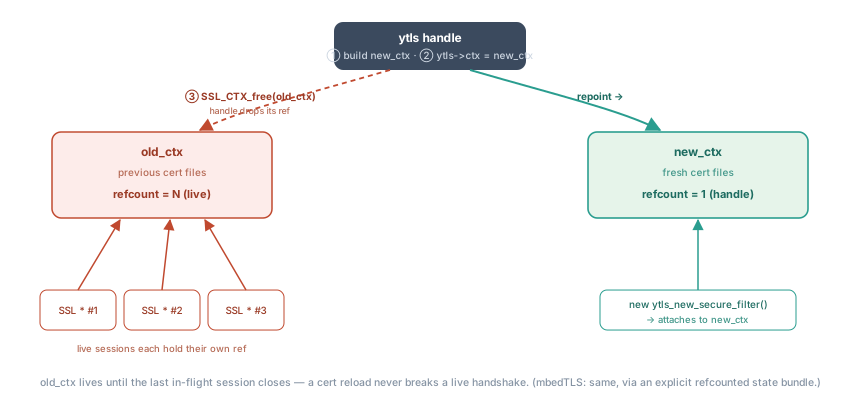
The ytls handle drops its ref on old_ctx, but each live session keeps its
own — so old_ctx outlives the swap until the last handshake on it closes.
This is the core correctness property — documented here because it is the easiest thing to break when touching the reload path.
OpenSSL backend. SSL_new(ctx) increments the SSL_CTX refcount
automatically. SSL_free(ssl) decrements it. When
ytls_reload_certificates()
runs:
Build
new_ctxwith fresh cert files.Swap
ytls->ctx = new_ctx.SSL_CTX_free(old_ctx)— drops the ytls handle’s ref.
Live SSL * objects retain their own ref on old_ctx, so the old
context lives until the last in-flight session closes. A new call to
ytls_new_secure_filter()
uses new_ctx.
mbed-TLS backend. The ytls layer maintains an explicit
mbedtls_state_t bundle (mbedtls_ssl_config + mbedtls_x509_crt +
mbedtls_pk_context) with a refcount. Each hsskt takes a ref on
creation and releases it on ytls_free_secure_filter(). The swap drops
the ytls handle’s ref. Same end result: live sessions stay valid.
Troubleshooting
Hook seems to run but certs never update. ycommand -c 'cert-sync-status'
returns deploy_hook_last_run: 0 or a stale timestamp. Check
/var/log/yuneta/deploy-hook.log — each step logs its own success /
failure line. The agent auto-sync will still pick up the new certs
within cert_sync_interval_sec, so this is an alert condition rather
than a service outage.
Reload returns -1 and nothing changes. The new cert material
failed validation — wrong key, unparseable PEM, missing file. Check
the yuno log for the SSL_CTX_use_certificate_file() FAILED,
SSL_CTX_check_private_key() FAILED or mbedtls_x509_crt_parse_file() FAILED
entries. The previous context is kept intact, so traffic is
unaffected — you can fix the source files and re-run
ycommand -c 'cert-sync-now'.
days_remaining: -5 on a listener. The cert expired 5 days ago.
Either the renewal path is completely broken or the listener is
reading a file that certbot does not manage. Compare
gobj_read_attr(listener, "crypto") against the actual renewal
source.
Tests
Five tests ship in-tree to protect the feature:
tests/c/ytls/test_cert_reload.c— swap A→B + rollback on invalid cert.tests/c/ytls/test_cert_info.c— cert introspection edge cases (short / long validity, self-signed invariant, serial shape, client-side NULL, already-expired cert).tests/c/ytls/test_cert_reload_mem.c— 1000 reloads with no live session, assertsget_cur_system_memory() == 0.tests/c/yev_loop/yev_events_tls/test_yevent_reload_live.c— one reload while a TCP session is live. The session keeps working.tests/c/yev_loop/yev_events_tls/test_yevent_reload_stress.c— 50 reloads with a live session, one echo message per iteration.
Run the full suite under valgrind for an exhaustive leak check:
valgrind --leak-check=full \
    outputs/tests/c/ytls/test_cert_reload_mem