This document covers yuno-skeleton, the templated scaffolder shipped with
Yuneta, and how to use it correctly so a freshly-created yuno or gclass
matches the conventions enforced elsewhere (notably CLAUDE.md’s
“GClass templates and skeletons” hard rule).
Sibling to YUNO_LIFECYCLE.md (deploying yunos),
REALMS.md (the realm a yuno belongs to),
DEBUGGING.md, IPC.md.
1. Which template to pick¶
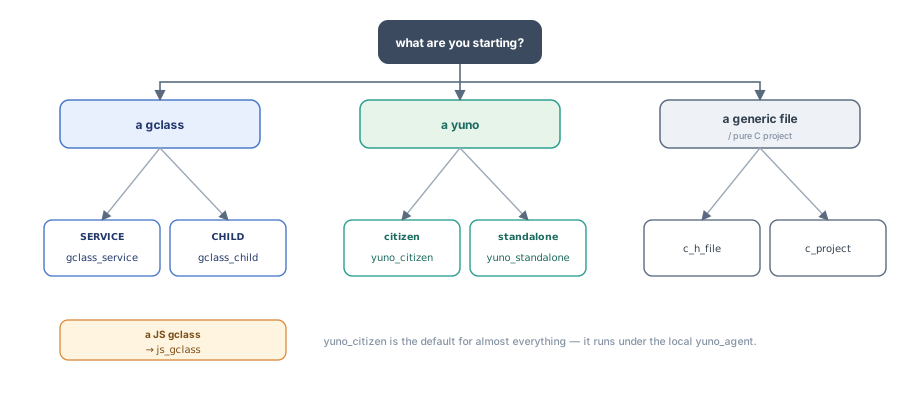
The same decision in text:
                  what are you starting?
                            │
       ┌────────────────────┼────────────────────┐
       │                    │                    │
       ▼                    ▼                    ▼
   a gclass            a yuno              a generic file
       │                    │              / pure C project
       │                    │                    │
   ┌───┴────┐         ┌─────┴─────┐              ▼
   │        │         │           │         c_h_file
   │        │         │           │         c_project
SERVICE    CHILD   citizen     standalone
   │        │         │           │
   ▼        ▼         ▼           ▼
gclass_  gclass_   yuno_       yuno_
service  child     citizen     standalone

JS gclass → js_gclass| Template | Use when … |
|---|---|
yuno_citizen | New yuno that will run under the local yuno_agent — registers itself, ships logs via the standard handlers, participates in realm coordination. The default for almost everything. |
yuno_standalone | New yuno that runs outside the agent — own argp CLI, accepts -f <config_file>, no agent dependency. Useful for one-shot CLIs, test harnesses, edge cases. |
gclass_service | New service-level gclass — addressable by name, optional subscriber attr, public-event publication. Goes inside an existing yuno. |
gclass_child | New child-level gclass — created with a parent (gobj_create_pure_child or similar), parent is the natural audience. |
js_gclass | JS equivalent of a gclass, intended for the browser/SPA gobj framework. |
c_h_file | Standalone .c + .h pair, no gobj framework. Only a helper module. |
c_project | Pure C project, only argp-standalone.h as a dep. No Yuneta runtime. |
The CLAUDE.md rule is non-negotiable: every gclass and every yuno must match the structure of the matching template, even when sections are empty. New gclasses → copy the template. Legacy gclasses → do not reorder them. Merge the new code into the existing layout.
2. CLI usage¶
The tool is yuno-skeleton, installed by the utils/c/yuno-skeleton/
build. Arguments declared at yuno_skeleton.c:
| Flag | Meaning |
|---|---|
--list, -l | List available templates (reads __skeletons__.json) |
--skeletons-path, -p PATH | Override the default skeletons directory (default /yuneta/bin/skeletons) |
positional SKELETON | Template name to instantiate |
Typical invocations:
yuno-skeleton --list                          # show what's available

yuno-skeleton yuno_citizen   my_service       # new citizen yuno → ./my_service/
yuno-skeleton yuno_standalone my_tool         # new standalone yuno → ./my_tool/
yuno-skeleton gclass_service my_svc           # new service gclass → ./c_my_svc.{c,h}
yuno-skeleton gclass_child   my_child         # new child gclass
yuno-skeleton js_gclass      my_widget        # new JS gclass
The tool walks you through the catalog’s per-template vars (description,
author, license, …) interactively. The <name> you pass becomes the
rootname variable used everywhere.
If you do not see what you expect, make sure that the catalog path
(__skeletons__.json) and the templates live where --skeletons-path
points.
3. The catalog (__skeletons__.json)¶
Lives at utils/c/yuno-skeleton/skeletons/__skeletons__.json. Each entry:
{
  "name":    "<template-name>",
  "summary": "<one-line description>",
  "type":    "GClass" | "Yuno" | "Utility",
  "vars": [
    { "var": "description", "message": "…", "default": "" },
    { "var": "author",      "message": "…", "default": "" }
  ]
}
Current entries (by line range in the JSON):
| Lines | Name | Type | Summary |
|---|---|---|---|
| 3-18 | c_h_file | GClass | Generic .c + .h file |
| 20-50 | c_project | Utility | Pure C project (only argp-standalone.h) |
| 52-67 | js_gclass | GClass | JS Yuneta gclass |
| 69-84 | gclass_service | GClass | Service gclass with timer (canonical SERVICE) |
| 86-101 | gclass_child | GClass | Typical child gclass (canonical CHILD) |
| 103-133 | yuno_standalone | Yuno | Standalone yuno project |
| 135-165 | yuno_citizen | Yuno | Realm’s citizen yuno project |
If you add a new template, follow the same shape. The runner parses this file at startup to fill the prompts.
4. The templating engine¶
make_skeleton.c + tmpl_dir.c. Two substitution layers, both using
PCRE2 regex.
4.1 Content placeholders: {{varname}}¶
tmpl_dir.c. Pattern (\{\{.+?\}\}). Every {{var}} block in a
file whose name ends in _tmpl is replaced by the matching value from
jn_values. The templates use it inside main.c_tmpl,
c_+rootname+.c_tmpl and the other _tmpl files.
4.2 Filename placeholders: +varname+¶
tmpl_dir.c. Pattern (\+.+?\+). Every +var+ block in a
filename or directory name is replaced. The _tmpl suffix is stripped
on output (tmpl_dir.c). Example:
template path:   skeletons/gclass_child/c_+rootname+.c_tmpl
rootname=foo →   ./c_foo.c
4.3 Derived variables¶
The catalog gives the user-prompted vars. The engine adds derived ones
automatically in make_skeleton.c:
| Variable | Derivation |
|---|---|
rootname | The <name> argument, lowercased |
Rootname | Capitalised (first letter upper) |
ROOTNAME | Uppercased |
yunorole | Yuno role, lowercased (for yuno templates) |
Yunorole | Capitalised |
YUNOROLE | Uppercased |
__year__ | Current year from system time |
Use the right case form in your edits. Mixing them silently produces
ugly identifiers (C_my_service instead of C_MY_SERVICE).
4.4 Files that are not templated¶
Files whose name does not end in _tmpl are copied verbatim, even
if they contain {{var}} markers. The _tmpl suffix is the opt-in
trigger.
5. yuno_citizen vs yuno_standalone¶
Both produce a src/main.c plus the gclass scaffolding for the yuno’s
main service. The structural difference is in main.c_tmpl.
5.1 yuno_citizen (default for almost all yunos)¶
skeletons/yuno_citizen/src/main.c_tmpl:
Calls
register_c_{{rootname}}().The
environmentblock wires the standard log handlers: UDP to logcenter, file to local rotatory, stdout when running in console mode. SeeDEBUGGING.md§5.4.fixed_configsetsyuno_roleand tags.variable_configdeclares the standard service stack: anauthzservice plus the app service.Memory tuning aimed at “lots of small services on a host” (~200M).
Talks to its local yuno_agent over an ievent channel (the identity
card handshake — see IPC.md §4.4). Logs ship via UDP to
logcenter by default. Use it for everything that you deploy with
run-yuno.
5.2 yuno_standalone (CLI / test / edge)¶
skeletons/yuno_standalone/src/main.c_tmpl:
Has its own
argpCLI parser — accepts-f <config>and-V/--version.No
authzservice, and no agent connection.fixed_config+variable_configsimpler — only the app service.Memory tuning aimed at “one process owns the host” (~1G blocks).
Use it when the binary must run independently of any agent, for example a CLI tool, a test harness, or an edge device that does not ship with a full agent.
6. gclass_service vs gclass_child¶
Both produce a c_+rootname+.{c,h} pair conforming to CLAUDE.md’s
banner structure. The crucial structural difference is the mt_create
subscription block. Both versions are in the templates verbatim — copy
them exactly, do not refactor.
6.1 gclass_service — SERVICE pattern¶
skeletons/gclass_service/c_+rootname+.c_tmpl:115-124:
hgobj subscriber = (hgobj)gobj_read_pointer_attr(gobj, "subscriber");
if(subscriber) {
    gobj_subscribe_event(gobj, NULL, NULL, subscriber);
} else if(gobj_is_pure_child(gobj)) {
    subscriber = gobj_parent(gobj);
    gobj_subscribe_event(gobj, NULL, NULL, subscriber);
}
Reads:
The standard case: a SERVICE has its
subscriberset explicitly by whoever wires it.The fallback: if something created the gobj as a pure child, the gobj subscribes the parent instead.
Service templates also include help and authzs commands in their
command_table.
Use for anything that is registered with gobj_create_default_service,
gobj_create_service, or expected to be reachable by name from
another yuno or the SPA.
6.2 gclass_child — CHILD pattern¶
skeletons/gclass_child/c_+rootname+.c_tmpl:83-89:
hgobj subscriber = (hgobj)gobj_read_pointer_attr(gobj, "subscriber");
if(!subscriber) {
    subscriber = gobj_parent(gobj);
}
gobj_subscribe_event(gobj, NULL, NULL, subscriber);
Reads:
Use the explicit
subscriberif provided, otherwise unconditionally the parent.There is no else — every child gets a subscriber.
The CHILD pattern assumes the gobj is always created with a parent
(gobj_create_pure_child, gobj_create_volatil and the other create
functions). The parent’s
FSM must declare every event the child can publish (see
IPC.md §3.5 — this is the canonical “Event NOT DEFINED in
state” source).
Use for per-connection objects, protocol handlers, transient helpers that always have a parent.
7. The banner convention¶
CLAUDE.md (“GClass templates and skeletons”): every banner from the
skeleton must be present, even when its section is empty. Do not add
extra banners outside the skeleton set. Do not reorder sections in legacy
gclasses. Merge new code into the existing layout, to keep git blame
clean. Greenfield gclasses follow the skeleton order.
The banner blocks the templates ship (example from
yuno_citizen/src/c_+rootname+.c_tmpl):
                    /******************************
                     *      Framework Methods
                     ******************************/

                    /***************************
                     *      Commands
                     ***************************/

                    /***************************
                     *      Local Methods
                     ***************************/

                    /***************************
                     *      Actions
                     ***************************/
The templates also carry the canonical headers for Attributes,
PRIVATE DATA, Event types and States. See c_yuno.c (large
reference example) and c_timer.c (minimal reference example).
Important consequences:
Do not delete a banner because its section has no entries.
Do not insert a section between two banners.
Do not rename a banner. The format is exact, so count the blank lines and the asterisks.
8. Post-scaffold checklist¶
After yuno-skeleton <template> <name> you have a tree with rendered
_tmpl files. Standard next steps:
cd <name>
mkdir build && cd build
cmake ..
make
For a citizen yuno you must also do these steps:
Create a binary record in the agent:
install-binary content64=$$(<role>)(seeYUNO_LIFECYCLE.md§6.1).Create a configuration:
create-config id=<role>.<name> content64=$$(<role>_<name>.json). The alias isinstall-config, and the__version__field inside the file gives the version.Create the yuno record that links realm, binary and config.
Enable the yuno, then run it.
For a standalone yuno, run the binary with -f <config.json>.
If you scaffolded a new gclass, you also need to:
#include "c_<rootname>.h"in the consumer.Call
register_c_<rootname>()in the consuming yuno’smain.c.Verify that you registered it before any
gobj_create*that mentions the gclass — otherwise the runtime aborts.
9. Sharp edges¶
9.1 Do not refactor away the mt_create subscription block¶
The exact two patterns in §6.1 and §6.2 are CLAUDE.md hard rules. They look
strange, because the inverted condition else if(gobj_is_pure_child(gobj))
in the SERVICE case looks like a defect. It is not a defect. It is a
deliberate fallback that prevents “Publish event WITHOUT subscribers” in
mixed deployments. Copy it exactly.
9.2 The _tmpl suffix is the opt-in¶
A file without _tmpl is not rendered, even if it contains
{{var}} markers. If you write your own template and forget the suffix,
you get the literal {{rootname}} in the output.
9.3 +varname+ only renames, {{varname}} only fills content¶
The two syntaxes are not interchangeable. If you want a file named after
a variable, use +var+. If you want the variable’s value inside the
file, use {{var}}.
9.4 Case forms are not aliases¶
{{rootname}}, {{Rootname}}, {{ROOTNAME}} are three different
variables. The template author picks each occurrence consciously. If
you mix them, you produce names like C_my_service or c_MY_SERVICE
that compile but read like a bug report.
9.5 --skeletons-path defaults to /yuneta/bin/skeletons¶
A development checkout has them at
utils/c/yuno-skeleton/skeletons/. If the installed copy is out of date,
pass -p to point at the working tree.
9.6 The README mentions a sibling ymake-skeleton¶
utils/c/yuno-skeleton/README.md:12: “See also ymake-skeleton for
cloning from an existing project rather than a template library.”
ymake-skeleton is a separate utility (not in utils/c/yuno-skeleton/).
Use it when you want to start from an existing yuno rather than a
template — closer to “clone this project into a new name”. The
yuno-skeleton tool is the right pick for greenfield.
9.7 The JS yuno scaffold lives outside this repo (since 2026-05-21)¶
CLAUDE.md notes that the JS GUI yuno scaffold moved out of yunetas
to wattyzer/templates/js_gui/ when gobj-ui v8.0 landed. The
js_gclass template still lives here and produces a single JS gclass,
not a full GUI yuno project. For a new SPA, start from wattyzer’s
template.
10. Recipes¶
10.1 New citizen yuno from scratch¶
# 1. scaffold
yuno-skeleton yuno_citizen my_widget_service

cd my_widget_service
mkdir build && cd build
cmake .. && make

# 2. install the binary in the agent
ycommand -c "install-binary content64=\$\$(my_widget_service)"

# 3. install a config (a JSON file you've written; version from its __version__)
ycommand -c "create-config id=my_widget_service.instance_01 content64=\$\$(my_widget_service_instance_01.json)"

# 4. create the yuno record (realm must already exist — see REALMS.md)
ycommand -c "create-yuno realm_id=<realm-id> yuno_role=my_widget_service yuno_name=instance_01"

# 5. start
ycommand -c "enable-yuno id=<yuno_id>"
ycommand -c "run-yuno    id=<yuno_id>"
10.2 Add a new SERVICE gclass to an existing yuno¶
cd <existing-yuno>/src
yuno-skeleton gclass_service my_new_service

# the new files: c_my_new_service.c, c_my_new_service.h

# in <existing-yuno>/src/CMakeLists.txt
#   add c_my_new_service.c to the sources list

# in <existing-yuno>/src/main.c
#   #include "c_my_new_service.h"
#   call register_c_my_new_service() BEFORE the first gobj_create

# rebuild + redeploy (YUNO_LIFECYCLE.md §6.2)
10.3 Add a new CHILD gclass¶
yuno-skeleton gclass_child my_child

# - register in main.c BEFORE the first gobj_create that uses it
# - the parent gclass MUST declare every event my_child publishes,
#   in its event_action_list for the relevant states
#   (otherwise: "Event NOT DEFINED in state" — see IPC.md §8.2)
10.4 New JS gclass for the SPA¶
yuno-skeleton js_gclass my_widget

# rendered to my_widget.js with the CHILD subscription pattern.
# Drop it into the SPA's source tree and register via the JS framework's
# normal gclass registration (gobj_create + register_gclass equivalents
# in kernel/js/gobj-js — see IPC.md §7 for the SPA case).
10.5 Standalone CLI tool (no agent)¶
yuno-skeleton yuno_standalone my_tool
cd my_tool
mkdir build && cd build
cmake .. && make

# Run directly with a config file
./my_tool -f /path/to/my_tool.json
11. Code pointers¶
| What | Where |
|---|---|
| Tool entry point | utils/c/yuno-skeleton/yuno_skeleton.c |
| Templating engine (variables + dispatch) | utils/c/yuno-skeleton/make_skeleton.c |
| Directory walker + content rendering | utils/c/yuno-skeleton/tmpl_dir.c |
| Template catalog | utils/c/yuno-skeleton/skeletons/__skeletons__.json |
yuno_citizen main template | utils/c/yuno-skeleton/skeletons/yuno_citizen/src/main.c_tmpl |
yuno_standalone main template | utils/c/yuno-skeleton/skeletons/yuno_standalone/src/main.c_tmpl |
| SERVICE gclass subscription block | skeletons/gclass_service/c_+rootname+.c_tmpl:115-124 |
| CHILD gclass subscription block | skeletons/gclass_child/c_+rootname+.c_tmpl:83-89 |
| JS gclass template | skeletons/js_gclass/+rootname+.js_tmpl |
| Banner-rule discussion | CLAUDE.md — “GClass templates and skeletons” |
| Canonical large gclass examples | kernel/c/root-linux/src/c_yuno.c, yunos/c/yuno_agent/src/c_agent.c |
| Canonical minimal gclass example | kernel/c/root-linux/src/c_timer.c |