This document describes what the Yuneta agent (yuno_agent) does when you
create, start, pause, kill, update or delete a yuno on a host. It gives the
picture on disk, in memory and on the wire, not the marketing picture.
Yuno = binary + configuration. Those two halves are stored independently, versioned independently, and linked by the yuno record. Understanding that is the prerequisite to understanding everything else here.
The agent’s authoritative source is
src/c_agent.c (~11k lines) and its treedb schema
src/treedb_schema_yuneta_agent.c. Every
claim below cites its source file and line.
1. Mental model¶
                         ┌───────────────────────┐
                         │       yuno_agent      │
                         │   (one per host)      │
                         └───────────┬───────────┘
                                     │ owns
                                     ▼
                         ┌───────────────────────┐
                         │  treedb (timeranger2) │
                         └───┬───────┬───────┬───┘
                             │       │       │
              ┌──────────────┘       │       └───────────────┐
              ▼                      ▼                       ▼
       ┌─────────────┐       ┌─────────────────┐      ┌─────────────┐
       │  binaries   │       │ configurations  │      │    yunos    │
       │  (per role  │       │ (per role+name  │      │ (registered │
       │  + version) │       │   + version,    │      │  instances) │
       │             │       │  blob zcontent) │      │             │
       └──────┬──────┘       └────────┬────────┘      └──────┬──────┘
              │                       │                      │
   resolves   │            materialised at start             │  references:
   yuno_role  │            into JSON files inside            │   role+role_version
   + role_    │            <realm>/<yuno>/bin/                │   role+name+name_version
   version    │                                              │
              ▼                                              ▼
   /yuneta/repos/<tags>/                          /yuneta/realms/<owner>/
   <role>/<version>/<role>                        <realm>/<yuno>/{bin,data,logs}
The agent is the only thing that must touch those directories. Manual edits create a drift with treedb, and you see it only when the next start fails.
2. Data model¶
2.1 The binaries topic¶
Defined in treedb_schema_yuneta_agent.c. Composite key:
| Column | Role |
|---|---|
id | pkey, equals the yuno role (for example mqtt_broker) |
version | pkey2, semver string extracted from the binary itself |
size | file size, computed at install time |
date | timestamp |
binary | absolute filesystem path |
yunos | fkey → which yunos rows currently use this binary |
tags | classification (used in the on-disk path) |
Multiple versions per role coexist. The yuno record decides which version is used (see §2.3).
On-disk path, built by yuneta_repos_yuno_dir() (c_agent.c:7313) and
yuneta_repos_yuno_file() (c_agent.c:7342):
<yuneta_root_dir>/repos/<tags>/<role>/<version>/<role>The file inside is the executable, and the filename is the role again.
2.2 The configurations topic¶
Defined in treedb_schema_yuneta_agent.c. Composite key:
| Column | Role |
|---|---|
id | pkey, format <role>.<name> (for example mqtt_broker.broker_01) |
version | pkey2 |
zcontent | compressed JSON payload — the actual config |
The blob lives in treedb. At start time the agent materialises it to a
.json file under the yuno’s bin/ directory and hands that path to the binary
via --config-file='[<paths>]' when it launches the process. Both steps run
inside run_yuno():
it writes the config through
build_yuno_running_script(),
then exec’s the binary with the materialised paths.
A materialised config holds the yuno’s secrets (a client_secret, a
password), so every file of bin/ that the agent writes for it is mode
0640. The owner is the user the agent runs as (the yuno runs as the
same user). The group is the group of bin/ when bin/ is setgid, else the
agent’s primary group. bin/ is setgid only when the directory above it is:
mkdir() drops the setgid bit from the mode it is given (the 02775 the
agent asks for), and a new directory takes it only from a setgid parent. On
nodes whose bin/ directories are drwxrwxr-x yuneta:yuneta, without the
setgid bit, the group is yuneta either way. At every launch the agent writes
each file again: to a temporary file in bin/ (.config.XXXXXX; up to
7.25.21 .<n>-<role>^<name>.json.XXXXXX, eight bytes longer than the file,
so a name a few bytes under NAME_MAX could not be written), created with
that mode, then renamed over the old one. So the new file is the
agent’s own whoever owned the old one (for example a file of another user
that the agent could write only through the group), a symbolic link at that
name is replaced and never followed, and a failed write leaves the old file
whole. If a file cannot be written, the yuno is not run (“A configuration
file of the yuno cannot be written, not run”); bin/ must be writable by
the agent, as it is when the agent creates it. Up to 7.25.20 they were
0664, readable by every user of the node.
The number of files changes with the yuno (a user configuration, required
services). So an earlier launch may have left 4-<role>^<name>.json where
this one writes only three. The launch script does not name it and the yuno
never reads it, but its secrets are still in it. At every launch the agent
narrows each such file (a number over the ones it wrote now) to 0640. It
never widens a mode, never removes a file, and leaves a symbolic link as it
is (with a warning). The one exception is a temporary file that a write left
because the agent died before its rename (.config.XXXXXX, or the
.<n>-<role>^<name>.json.XXXXXX of 7.25.21): it is removed, with the warning
“A temporary configuration file of a yuno, left by an interrupted write,
removed”, if it is a regular file. The agent also removes them for every
yuno when it starts (only its own death leaves one), so a yuno that is not
launched again keeps none: up to 7.25.21 only its next launch did. A file it cannot narrow is logged, and the yuno still
runs: that file is not part of its configuration.
2.3 The yunos topic¶
Defined in treedb_schema_yuneta_agent.c. Per-yuno record. Important
columns:
| Column | Meaning |
|---|---|
id | pkey, the yuno’s unique id |
realm_id | fkey → the realm this yuno belongs to |
yuno_role | which binary (joins to binaries.id) |
role_version | which version of that binary |
yuno_name | which configuration (joins to configurations.id = role.name) |
name_version | which version of that configuration |
yuno_release | additional identity |
yuno_disabled | bool — disabled yunos are skipped at boot |
yuno_running | bool — true while the agent holds an open channel to the yuno |
yuno_playing | bool — true after a successful EV_PLAY_YUNO_ACK |
yuno_pid | last known pid (0 when not running) |
must_play | bool — auto-play after EV_ON_OPEN handshake |
start_priority | int 0..9 (default 5) — node-local launch order. See §4.8. |
sched_priority | int (default 20) — injected as the yuno’s sched_priority attr. See §4.8. |
cpu_core | int (default 0) — injected as the yuno’s cpu_core attr. See §4.8. |
configurations | hook — N:M against configurations for multi-file config sets |
A yuno record without a matching binaries row or configurations row fails at
create time, not at start time:
cmd_create_yuno()
rejects the request as soon as one of the two lookups returns empty.
start_priority, sched_priority and cpu_core are node placement
decisions. They live with the agent, which is this node. They do not live in
the binary or in its config, because those travel across nodes. They arrived
with topic_version 19→20 and schema_version 22→23. The bump only
refreshes the col schema and does not touch record data. Existing yunos
therefore keep their data and read the defaults until you set them with
update-node.
2.4 Realm and per-yuno layout¶
Built by build_yuno_private_domain() (c_agent.c:7368):
<yuneta_root_dir>/realms/<realm_owner>/<realm_name>.<realm_role>.<realm_env>/<yuno_role>_<yuno_name>/
  ├── bin/        ← N-<role>_<name>.json (materialised configs)
  ├── data/       ← <GClass>-<name>-persistent-attrs.json (only once a service saves one)
  └── logs/       ← N.log files
The bin/ directory is not the binary. It is the working dir the yuno gets
config files from. The actual binary lives in /yuneta/repos/ (see §2.1).
The data/ directory holds the persistent attributes
of the yuno’s services — SDF_PERSIST attrs that a service changed and saved at run-time,
one <GClass>-<name>-persistent-attrs.json per service
(db_save_persistent_attrs()). It is created
lazily: it does not exist until the framework saves the first attr. A load
never creates it (db_load_persistent_attrs()
reports “nothing saved” when the file is absent). At startup the framework
seeds each service from its merged config, and then it writes these saved
values on top. So a persisted attr has precedence over the same key in any
configuration file. Only services and __root__ load them. Pure children do
not.
3. Command inventory¶
Registered in the agent’s command table. Yuno + binary + config commands only (admin, realm, certs and console commands omitted):
Binaries¶
| Command | Effect |
|---|---|
install-binary | Decode content64, introspect role+version, refuse if (role, version) already exists, write file, create treedb row. |
update-binary | Same as install but overwrites the existing (role, version) row and file in place. Description literally says “WARNING: Don’t use in production!”. |
delete-binary | Pass version= to durably prune one installed version (per-instance delete). Without it, the primary. Refuses if a yuno on that version still references it (validated per-yuno via gobj_get_node, so stale hook refs do not block) or a snap tags it (__md_treedb__.tag). force=1 overrides. Then gobj_delete_node + rmrdir. |
list-binaries | gobj_list_nodes("binaries", filter), returns one node per role — the binary in use (primary per id). |
list-binaries-instances | gobj_list_instances("binaries", "", filter), returns one row per installed (role, version) so every version is visible. |
Configurations¶
| Command | Effect |
|---|---|
create-config (alias install-config) | Decode content64, read version from the __version__ field inside it, refuse if (id, version) already exists, create the row in configurations. The install-config alias mirrors install-binary. |
update-config | Overwrite the zcontent of an EXISTING (id, version) row (version again read from __version__). Fails “Configuration not found” if the row does not exist — it does not create. |
delete-config | Pass version= to durably prune one config version (per-instance delete). Without it, the primary. Fails if a yuno on that version references it (validated per-yuno via gobj_get_node, so an unused version prunes even while another is in use, and stale hook refs do not block). force=1 overrides. |
list-configs | gobj_list_nodes("configurations", filter), one node per id (the primary version). |
list-configs-instances | gobj_list_instances(...), one row per (id, version) so every version is visible. |
view-config | A ycommand console helper, not an agent command. It reads the stored zcontent for a given (id, version). Does not return the merged effective config that the running yuno sees. For that, ask the yuno itself with command-yuno service=__yuno__ command=view-config. |
Yunos¶
| Command | Effect |
|---|---|
create-yuno | Create a row in yunos. Validates realm + binary + config existence. |
delete-yuno | Pass yuno_release= to durably prune one release instance (for example a superseded or higher release), or whole=1 for the yuno and all its releases. The bare form is refused. It refuses if yuno_running=true (checked against the primary, since instance rows carry a stale flag) or if tagged, unless force=1. Then it deletes the row. |
enable-yuno | yuno_disabled := false. |
disable-yuno | yuno_disabled := true. Does not stop a running yuno. |
run-yuno | Spawn matching (disabled=false, running=false) yunos. See §4. |
kill-yuno | Orderly shutdown of matching running yunos. Sends signal2kill (SIGQUIT by default). See §4. |
play-yuno | Send EV_PLAY_YUNO event over the yuno’s channel. Flip must_play=true. |
pause-yuno | Send EV_PAUSE_YUNO event over the yuno’s channel. Flip must_play=false. |
command-yuno | Wildcard: forward an arbitrary command to a running yuno’s service. |
list-yunos | All yunos rows with current pid + state. |
view-yuno-config | The stored configs attached to a yuno (still not the effective merged one). |
stats-yuno | Forward a stats request to the running yuno. |
watch-yuno-stats | Send the stats of some yunos to the requester every period (EV_YUNO_STATS), until stop=1 or its connection closes. |
Permission gating is per-command via pm_<name> schemas.
4. Lifecycle, step by step¶
4.1 State machine of a single yuno (as the agent sees it)¶
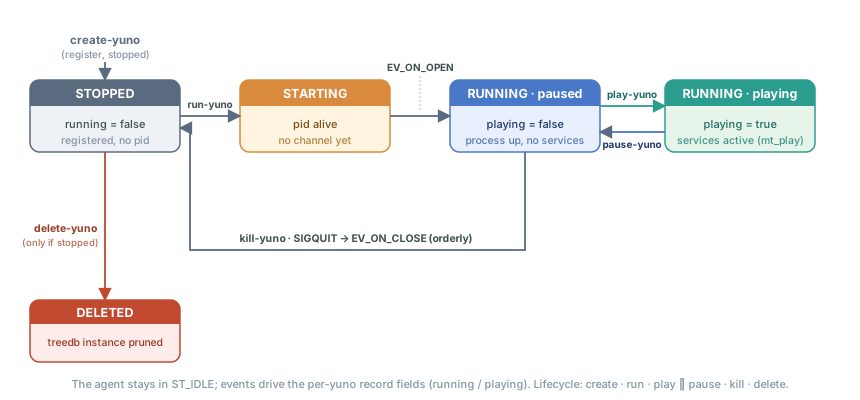
The same machine in text (the precise transitions the agent drives on the per-yuno record fields):
                                  delete-yuno
                              ┌─────────────────────┐
                              │  (only if stopped)  │
                              ▼                     │
                          ┌────────┐               ┌┴────────────┐
   create-yuno  ─────────►│ STOPPED│◄──────────────┤  DELETED    │
                          └────┬───┘  EV_ON_CLOSE  └─────────────┘
                               │                        ▲
                               │                        │
                  run-yuno     │                        │ kill-yuno
                  (fork+exec   │                        │ (SIGQUIT)
                   + handshake)│                        │
                               ▼                        │
                          ┌────────┐                    │
                          │STARTING│                    │
                          │(pid    │                    │
                          │ alive, │                    │
                          │ no chan│                    │
                          │ yet)   │                    │
                          └────┬───┘                    │
                               │  EV_ON_OPEN            │
                               │  (yuno reports pid +   │
                               │   watcher_pid)         │
                               ▼                        │
                          ┌────────┐    EV_PAUSE_YUNO   │
                          │RUNNING ├────────────────┐   │
                          │playing │                │   │
                          │=true   │◄──────┐        │   │
                          └───┬────┘       │ ACK    ▼   │
                              │            │   ┌────────┴┐
                              └────────────┘   │ RUNNING │
                                               │ paused  │
                       EV_PLAY_YUNO_ACK        │ =true   │
                                               └─────────┘
Note: the agent itself stays in ST_IDLE always. The diagram above is not
the agent’s own FSM — it is the lifecycle of a managed yuno as the agent tracks
it through the per-yuno record fields (yuno_running, yuno_playing,
yuno_pid), driven by the event types it receives over each yuno’s channel.
4.2 Registration: create-yuno¶
Requires realm + binary (yuno_role, role_version) + config
(yuno_role.yuno_name, name_version) to already exist. Defaults missing
versions to latest. Writes the row with yuno_running=false,
yuno_disabled=false, yuno_pid=0.
4.3 Start: run-yuno¶
Driven by run_yuno():
Select yunos:
disabled=false ∧ running=false.Resolve the binary via
get_yuno_binary(): prefer the active snapshot (gobj_list_snaps()), falling back to a direct(role, role_version)lookup.Materialise each
configurations.zcontentblob to a JSON file under the yuno’sbin/directory (build_yuno_running_script()).Build a launcher shell script that runs the binary with:
<binary> --config-file='["bin/1-role_name.json", "bin/2-role_name.json", …]' "$@"run_process2(bfbinary, argv)—fork/execvia a wrapper.The yuno opens a channel back to the agent and emits
EV_ON_OPENcarrying itspidandwatcher_pid(handlerac_on_open()). Only after this handshake does the agent setyuno_runningtotrueand storeyuno_pid/watcher_pid.If
must_play=true, the agent firesplay-yunoautomatically right after the open (ac_on_open()), unless the command was issued withplay=0(see below).
Implication: a yuno that forks fine but never opens the channel never
becomes running from the agent’s point of view, even if ps shows the
process alive. See §5 Stale pid.
Command response: one answer per command, and the play=0 knob¶
run-yuno returns a single command answer once all launched yunos have
connected back — like kill-yuno/pause-yuno/play-yuno. It aggregates the
per-yuno EV_ON_OPEN ACKs into one C_COUNTER (max_count=total) created
after the launch loop, exactly mirroring the other three commands.
The implicit auto-play of step 7, however, is inherently per-yuno and async
(each yuno connects at its own time), so in the default play=1 mode the
caller also sees one extra play-yuno answer per must_play yuno. Scripts
that need exactly one answer per command must split the two phases:
ycommand -c 'run-yuno play=0'   # launch only → 1 answer ("N yunos found to run")
ycommand -c 'play-yuno'         # play already-running yunos → 1 aggregated answer
Where that answer goes. It is sent when the counter completes, long after
the command returned, so it is not carried back by the call: ac_final_count()
resolves the requester by NAME and sends it an EV_MT_COMMAND_ANSWER. A local
ycommand is a child of __input_side__ and is found there; a client behind a
controlcenter is not — its command arrived through the agent’s outbound
controlcenter C_IEVENT_CLI, a top-level service. Up to 7.12.x the
lookup missed and the answer was dropped with “requester channel child not
found” in the agent’s log: the yuno was killed, or launched, and the caller
waited forever. A node with an older agent still behaves that way, which
matters to anything that chains these commands on their answers.
play=0 (default 1, backward-compatible) suppresses the auto-play for that
launch only. The agent records the launch_id in an in-memory set
(priv->no_play_launches). ac_on_open() consumes it by matching the
connecting yuno’s identity_cardlaunch_idand deletes it on first connect. It is not a treedb column and does not touchmust_play, so a watcher crash relaunch (which reuses the same launch_id, now absent) still reconciles must_play` per §4.6.
4.4 Pause / Play¶
These are not process signals. They are gobj events delivered through the yuno’s open channel:
play-yuno→EV_PLAY_YUNO→ yuno does whatever “playing” means for it →EV_PLAY_YUNO_ACK→ agent setsyuno_playing=true.pause-yuno→EV_PAUSE_YUNO→ … →EV_PAUSE_YUNO_ACK→ agent setsyuno_playing=false.
Most yunos use the play and paused gate to enable or disable the I/O processing without an exit. The process never stops. Only its inputs are gated.
4.5 Stop: kill-yuno¶
An orderly shutdown, not a SIGKILL, performed by
kill_yuno():
Read the
signal2killattribute (defaultSIGQUIT).kill(yuno_pid, signal2kill).If the chosen signal is
SIGKILL, the watcher is killed too. 4. No timer-based escalation in code. The agent trusts the signal handler of the yuno to shut it down. If the handler does not shut it down, the record of the agent keeps the yuno as “running” forever (see §5).When the channel closes,
ac_on_close()flipsyuno_running=false,yuno_playing=false,yuno_pid=0.
A yuno that matches and is alive but not connected (it lost its channel,
or outlived a restart of the agent: §4.6) is reached too. It is found in
/proc as the sweeps find it, and its processes -- watcher and child -- get
the same signal: signal2kill, or SIGKILL with force=1. The watcher
notes a SIGQUIT (it does not relaunch the child) and ends with its child’s
exit. Nothing will say it closed, so it is not waited for: the answer says
it at once, with its pids -- and says that a run-yuno sent before they are
gone does not launch them again (it finds them alive) --, and the answer of
the connected ones adds how many were signalled.
ycommand -c 'kill-yuno id=5020 force=1'
# yuneta_agent^node: 1 yuno(s) alive but not connected to the agent: signalled (9), not waited for: a run-yuno before they are gone does not launch them again
# data: [{"id": "5020", "yuno_role": "db_tracks_ce", "pids": [6933, 6934]}]
Up to 7.25.21 kill-yuno selected only the yunos the agent saw running, and
answered “Yuno not found or already not running” for one that lived
unconnected.
4.6 Crash detection and reconciliation¶
From the agent’s point of view, a crash is indistinguishable from a
clean kill: EV_ON_CLOSE fires, ac_on_close() runs, the treedb row
flips yuno_running=false. The agent has no SIGCHLD handler and does
not poll pids. It does not know “exited normally” from “segfaulted”.
The restart, however, does not depend on the agent. Every yuno
started with --start runs under a per-yuno watcher process (the
first-fork survivor in ydaemon.c). When the yuno child dies abnormally
(any signal other than SIGKILL, or any non-zero exit code), the watcher
sleeps 2s and re-execs the same binary. It does this whether the agent runs
or not. A yuno is an autonomous machine, and the watcher is what makes that
concrete. See
ENTRY_POINT.md §4
for the full decision matrix.
What the agent contributes on top:
It logs the closed channel and clears
yuno_pidandyuno_playing. A newrun-yunois not necessary. The watcher already forked a new child with a new pid, and that child connects to the agent on its own through the normalEV_ON_OPENhandshake.At agent boot the timer
ac_timeout()(c_agent.c:11393) runs:run_util_yunos()(c_agent.c:10024) — yunos taggedutil, ignoringdisabled.run_enabled_yunos()(c_agent.c:9938) — every row withdisabled=false ∧ running=false.
This reconciliation matters only for yunos that have no live watcher. Two examples: someone killed the agent itself and started it again, or the watchers of some yunos died too.
The agent launches a yuno once, and there its responsibility ends.
ac_on_open()setsrunning. So between the two sweeps a yuno is launched but not yet registered.run_yuno()marks it as launching, both sweeps skip a marked yuno, andac_on_open()clears the mark. Without that mark, the agent launched a second time anything that opened slower thantimerStBoot, for example a yuno that loads a treedb on the cold machine of a real boot. Therun-yunocommand honors the same mark, so an operator cannot start a second instance on a yuno that is still starting. The agent must not try a yuno again after it died before it opened. An abnormal death is the work of the watcher, and a cleanexit 0is the decision of the yuno to stay down.The mark carries its launch time and expires after
timeout_expiration(30s). A yuno that dies before it opens never clears its mark, and the agent watches no pids. Without the expiry, one failed launch blocksrun-yunofor that yuno until the agent restarts.A yuno alive that the agent does not know running is not launched again.
yuno_runningandyuno_pidsay only what the agent saw on the yuno’s channel, and they are not persistent: a yuno that lost its channel, or that outlived a restart of the agent, is “not running” there while it lives -- typically one still busy at start (loading a big queue or treedb) when the agent comes back. Before a launch, the two sweeps andrun-yunolook in/procfor a process of that yuno:argv[0]is its role and its command line names its configuration files in itsbin/(so a release change does not hide it, nor does a launch by hand with its.sh). If one lives, the yuno is skipped with a WARNING that names its pids:"msg": "yuno alive but not connected to the agent: not launched again", "yuno_id": "5020", "yuno_role": "db_tracks_ce", "pids": [6933, 6934]It comes back on its own when it reaches the agent. A
run-yunothat finds only such yunos answers “N yuno(s) alive but not connected to the agent: not launched again”.yuno.pidis not used for this: a yuno writes it where its own config says (logcenter’s is underrealms/agent/), not in thebin/the agent made. Up to 7.25.21 the agent launched a second instance: it opened the persistent queues of the living one “as not master” and aborted (“Message NOT SAVED in the queue”), and when the first one reconnectedac_on_open()killed it as the intruder. A node bounce (restart_nodes(),deactivate-snap) kills such a yuno too (SIGKILL, with a WARNING) before it runs them all again, andkill-yunosignals it (§4.5).
Forensics: a crashed yuno also dumps a core at /var/crash/core.<role>
(sysctl + PAM limits configured by the .deb, see
ENTRY_POINT.md §8).
The watcher emits a Daemon relaunched log line on every relaunch
(MSGSET_SYSTEM) — grep for it to spot silent crash loops.
4.7 Deletion: delete-yuno¶
Refuses if yuno_running=true. Optionally refuses on tagged yunos unless
force=1. It removes the treedb row, and the treedb cascade cleans the
bin/ directory on disk.
You must say WHICH of the two deletions you mean. The command refuses the bare form:
delete-yuno id=<id>                      # refused
delete-yuno id=<id> yuno_release=<rel>   # one release
delete-yuno id=<id> whole=1              # the yuno and every release behind it
Deleting the whole yuno used to be what you got by omitting yuno_release,
so the destructive reading was the one you reached by typing less. It cost a
realm its auth_bff once. force=1 does not stand in for whole=1: it
bypasses the snap-tag guard, a different question.
Pruning one release instance. With yuno_release=<rel> the command durably
prunes that one instance — useful to drop a superseded or mistakenly-created
higher release without a snap rollback. This rides the treedb per-instance
delete (treedb_delete_instance), which tombstones every md2 row of the
(id, yuno_release) — a treedb instance spans several rows (create + each
link/save re-appends one). With a partial tombstone, an earlier row therefore
restores the release on reload. The running-guard consults the primary (the
per-instance row carries a stale yuno_running). delete-config/delete-binary
gained the symmetric version= form for config/binary versions.
4.8 Start order and CPU placement¶
Three planes share the word “priority” — keep them apart:
| Plane | Where | What it controls |
|---|---|---|
| OS scheduling | yuno attr sched_priority + cpu_core (c_yuno.c, boost_process_performance) | sched_setscheduler + CPU affinity of the process |
| Intra-yuno | each service’s priority 0..9 (manage_services.c) | order services start within a yuno |
| Inter-yuno | agent col start_priority 0..9 (this section) | order yunos start on this node |
Launch order. cmd_run_yuno sorts the matched yunos by start_priority
ascending before spawning (sort_yunos_by_start_priority, c_agent.c). Lower
goes first: utilities (logcenter, emailsender, auth_bff) → gates → dba. Use a
low number for infrastructure that a node needs. The same ascending sort
is applied by run_enabled_yunos, so a node bounce (restart_nodes /
deactivate-snap) and the at-startup relaunch honour the tiers too. (The force
SIGKILL pass inside restart_nodes is left unordered on purpose: SIGKILL has no
graceful drain to sequence.)
Shutdown order. kill-yuno and pause-yuno sort descending, so the
utilities die last. For example, logcenter stays alive long enough to
capture the shutdown logs of all the others. Within one priority, the treedb
order is preserved (stable). Single-target commands, by id, do not change.
Default on creation. create-yuno seeds start_priority = 1 for a yuno
carrying the util tag — the same set run_util_yunos starts first — so
framework utilities are born at the top tier without operator action. A
genuinely new yuno otherwise takes the column default (5). No app role names are
hard-coded in the agent. Assign the app tiers per node with
tools/agent/set_start_priorities.py.
Inherited across version bumps. A version-bump deploy (find-new-yunos create=1) does NOT reset placement: cmd_find_new_yunos copies
start_priority / sched_priority / cpu_core from the prior primary row of
the same id into the emitted create-yuno, so the operator-set tiers survive the
bump. set_start_priorities.py is therefore a first-time-only step per node, not
a per-deploy chore. (Same-version update-binary hot-patches keep the existing
row and were never affected.)
CPU placement. sched_priority and cpu_core are injected into the
agent-built config file #1 as the yuno’s sched_priority / cpu_core attrs
(build_yuno_running_script). They are defaults only: the user config file
is merged after #1, so an explicit value in the yuno’s own config still wins
(precedence stays with the deployer). cpu_core=0 (the default) means no
affinity boost, that is, unchanged behavior.
Set any of the three live, no redeploy. The record= inline form is NOT
coerced from text by the ycommand CLI (“What record?”), so pass the node as a
strict-JSON file via content64=$$(<file>) (single quotes / unquoted keys
fail to decode):
printf '{"id":"<yuno_id>","start_priority":1,"cpu_core":2,"sched_priority":10}' > /tmp/rec.json
ycommand -c "command-agent service=treedb_yuneta_agent command=update-node topic_name=yunos content64=\$\$(/tmp/rec.json)"
(Over the websocket and the JSON API the record field is a real dict and works
directly. Only the text CLI needs the file form.)
5. Sharp edges (read these before touching production)¶
5.1 update-binary fails while the yuno is running (text-file-busy)¶
update-binary base64-decodes content64 to
/yuneta/realms/agent/agent/temp/<role>, then copies it over
/yuneta/repos/<tags>/<role>/<version>/<role>. The agent execs running
yunos directly from that repos path, so if a process is running that exact
file the copy is refused by the kernel (ETXTBSY) and the command returns:
ERROR -1: Cannot copy '/yuneta/realms/agent/agent/temp/<role>'
          to '/yuneta/repos/.../<version>/<role>'
It does not corrupt the live process. Linux does not let you overwrite a busy executable. The command’s description still says “WARNING: Don’t use in production!”.
So the same-version hot-patch order is mandatory: kill-yuno <role> FIRST,
then update-binary, then run-yuno. ($$(<role>) in ycommand reads the
freshly-built binary from $YUNETAS_YUNOS = outputs/yunos/<role>, so a plain
make install is enough to stage the new build.) For a real release, prefer
install-binary with a bumped version.
Note —
list-binariesshows the binary IN USE (the primary node per role). A runtimeupdate-binary(same version) mutates that primary node in place, so the new size/date appear immediately. Aninstall-binaryof a NEW version does not change whatlist-binariesshows untildeactivate-snappromotes and reloads it — which is correct: the new binary is not in use until then. To see every installed(role, version)from the moment it lands, uselist-binaries-instances(gobj_list_instances, the pkey2 iterator refreshed at runtime by dbf532ec9).
5.2 Stale yuno_running=true after a hard crash¶
If the yuno dies in a way that leaves the channel open (rare, but
SIGKILL-from-outside is one of them) ac_on_close() is never invoked. The
record keeps yuno_running=true and yuno_pid=<old-pid>.
On the next run-yuno, ac_on_open() checks getpgid(_pid) >= 0.
If another process took the old pid, the agent kills that new process.
This is the worst form of flapping. If you suspect a stale pid, clear
yuno_running and yuno_pid in treedb by hand before you try again.
5.3 No SIGKILL escalation, and the watcher gotcha¶
kill-yuno sends one signal and waits. There is no “after 30 seconds, try
SIGKILL”. A yuno that discards SIGQUIT, or whose signalfd handler is
blocked, stays alive, and the record of the agent stays at running.
A kill -9 <yuno_pid> from the shell ends the yuno for good: the watcher
takes a SIGKILL on its child as a decision, not a crash, and exits too
(ydaemon.c; any other signal is a crash, and the child is relaunched
after 2s). kill-yuno force=1 and set-quick-kill send
SIGKILL to both pids, the watcher too. That is the only way for the agent to
stop a yuno that does not cooperate
(c_agent.c, and ENTRY_POINT.md §7).
5.4 pause ≠ SIGSTOP, play ≠ SIGCONT¶
Pause and Play are channel events. The kernel never freezes the process. If
you want the process suspended, for example for gdb attach,
the agent gives you nothing — use the shell.
5.5 update-config does not hot-reload¶
c_agent.c updates the treedb blob. The launcher script is rebuilt only
at run-yuno. So changes take effect on next start. There is no
re-materialisation of the JSON files on disk for a running yuno.
5.6 disable-yuno does not stop a running yuno¶
c_agent.c only flips the flag. A disabled=true yuno that was already
running keeps running until you kill-yuno. The flag only prevents the next
run-yuno from picking it up.
5.7 install-binary vs update-binary¶
Same (role, version) exists? | install-binary | update-binary |
|---|---|---|
| Yes | refuses | overwrites file + row |
| No | creates | creates |
Pick install-binary for new versions. Pick update-binary only when you
truly want to overwrite — and then only if no yuno is running that version.
6. Operational recipes¶
All examples assume ycommand is talking to the local agent.
Bulk reconciliation. To compare every binary the agent has installed against the freshly built ones in
outputs/yunosand push the differences in one pass, usetools/agent/sync_binaries.py. It drives from the agent’s installed set. It proposesinstall-binaryfor version bumps, andupdate-binaryfor same-version rebuilds.-ndoes a dry run. For a same-version rebuild it also runs the per-role hot-patch cycle below (kill → poll → update → restore run and play state, scoped byyuno_role).--no-restartkeeps it print-only. The recipes below are the manual, per-yuno equivalents.
6.1 Onboard a brand-new yuno¶
# 1. install the binary (new role or new version)
ycommand -c 'install-binary content64=$$(my_role)'

# 2. install its configuration (create-config — the row does not exist yet;
#    version is read from the __version__ field inside the file)
ycommand -c 'create-config id=my_role.my_name content64=$$(my_role_my_name.json)'

# 3. create the yuno record (links binary + config to a realm)
ycommand -c 'create-yuno realm_id=<realm> yuno_role=my_role yuno_name=my_name'

# 4. enable, launch, then play (two steps = one response each)
ycommand -c 'enable-yuno id=<yuno_id>'
ycommand -c 'run-yuno play=0 id=<yuno_id>'
ycommand -c 'play-yuno id=<yuno_id>'

# 5. verify
ycommand -c 'list-yunos'
6.2 Hot-patch the binary at the same version (update-binary)¶
Use this when the version number in main.c (APP_VERSION) is
unchanged, for example a RelWithDebInfo rebuild for a quick fix
during a debug session. update-binary overwrites the existing
{role}/{version}/ slot in /yuneta/repos/... and the matching
treedb row. There is no rollback path, and the previous bytes are gone.
Always do an orderly shutdown first. Never update-binary over a live
mmap. The command itself does NOT refuse if a yuno using the binary
is running (see §5.1).
# 1. build (APP_VERSION unchanged in main.c)
cd /yuneta/development/yunetas/yunos/c/<yuno>/build && make clean && make install

# 2. orderly shutdown via the agent (NOT a manual kill)
ycommand -c 'kill-yuno yuno_role=<role>'

# 3. wait until it really left
ycommand -c 'list-yunos'    # expect yuno_running=false

# 4. overwrite the same-version slot in the agent repo
ycommand -c 'update-binary id=<role> content64=$$(<role>)'
ycommand -c 'list-binaries' # verify size/date

# 5. launch back, then play (two steps = one response each)
ycommand -c 'run-yuno play=0'
ycommand -c 'play-yuno'
For a real version bump (1.3.1.0 → 1.3.1.1, 7.3.4 → 7.4.0,
…) use the upgrade flow in §6.5 instead — update-binary is the
wrong tool, and the WARNING: Don't use in production! description
in command-yuno help applies precisely to that misuse.
6.3 Change a yuno’s configuration¶
update-config does not hot-reload, so you must restart the yuno. It
overwrites an existing config, and the __version__ field in the file gives
the version. To install a NEW version, use create-config instead (alias
install-config).
ycommand -c 'update-config id=<role>.<name> content64=$$(<file>.json)'
ycommand -c 'kill-yuno id=<yuno_id>'
ycommand -c 'run-yuno  play=0 id=<yuno_id>'
ycommand -c 'play-yuno id=<yuno_id>'

# verify the EFFECTIVE merged config (not the stored one)
ycommand -c 'command-yuno id=<yuno_id> service=__yuno__ command=view-config'
6.4 Retire a yuno¶
ycommand -c 'kill-yuno    id=<yuno_id>'    # orderly shutdown
ycommand -c 'list-yunos'                   # confirm running=false
ycommand -c 'disable-yuno id=<yuno_id>'    # belt and braces
ycommand -c 'delete-yuno  id=<yuno_id> whole=1'   # refuses if running
# binary stays in /yuneta/repos until you delete-binary it
6.5 Upgrade a yuno to a new release (version bump)¶
When APP_VERSION in main.c changes (1.3.1.0 → 1.3.1.1, or a
yunetas-side bump like 7.3.4 → 7.4.0), the canonical flow is
not kill-yuno + run-yuno. Both the old and the new
yuno-instance rows exist after registration, and the agent’s
in-memory primary index for the yunos topic still points at the
old pkey2 (yuno_release). Plain run-yuno will re-launch the
older release.
# 1. Build the new version
cd /yuneta/development/yunetas/yunos/c/<yuno>/build && make clean && make install

# 2. Push the new binary to the agent
#    install-binary creates a new <role>/<version>/ slot; refuses if
#    (role, version) already exists — that is the safety vs update-binary.
ycommand -c 'install-binary id=<role> content64=$$(<role>)'

# 3. Register a yuno-instance row at the new role_version
#    create=1 actually persists; without it, find-new-yunos just lists
#    the commands it would run. Both pkey2 rows now coexist:
#       <id> <realm> <role>  <yuno_release=OLD>
#       <id> <realm> <role>  <yuno_release=NEW>
#    Visible via `list-yunos-instances`; `list-yunos` still shows OLD
#    as primary. Until step 4 promotes it, a new `find-new-yunos` lists
#    the row as "already registered, pending promotion (deactivate-snap):
#    create-yuno id=<id> ..." and create=1 skips it (7.25.4 and before
#    listed it as a row to create, and create=1 failed with
#    "Yuno already exists").
ycommand -c 'find-new-yunos create=1'

# 4. Force the agent to promote the newest release to primary and restart
#    deactivate-snap (no args, no active snap) is the only command that
#    triggers `restart_nodes()`: SIGKILL every running yuno, then —
#    BEFORE the reload — `promote_highest_release_yunos()` re-appends the
#    highest non-disabled `yuno_release` per id so it becomes the highest
#    rowid. (The treedb primary is the highest-ROWID record, not the
#    highest version; lifecycle/snap writes can leave an older release on
#    top, which is why a plain reload alone is not enough — the old
#    "force volatil" TODO.) gobj_stop/start then rebuilds the primary
#    index from disk with the promoted release on top, and every
#    must_play yuno runs on it. Equivalent to `yshutdown` +
#    `restart-yuneta` but without restarting the agent process itself.
ycommand -c 'deactivate-snap'

# 5. Verify
ycommand -c 'list-yunos yuno_role=<role> yuno_running=true'
# release column should now read the new version. The OLD pkey2 row
# stays in treedb for rollback (see §6.6 below).
Versions only ever move forward¶
Both steps above rest on one assumption — that a release compares newer than the one it replaces — and until 7.12.0 that comparison was the only thing enforcing it. When it was wrong, nothing else noticed.
It was wrong. get_n_v() weighed each segment by 1000 into an int, so
1.9.0.0-2 needed 10¹², overflowed, and came out negative — older than
1.7.1.0-2. find-new-yunos therefore picked the older binary as “a
greater role version”, and promote_highest_release_yunos() re-appended the
older release as the primary. Not a failure to promote: an active
demotion, repeated at every restart for eleven days on a client node, while
every log line read like routine progress.
Two things changed, and both matter when reading this chapter:
The comparison is
version_cmp()in the SDK, comparing segment by segment with nothing accumulated into a number — the same shape the JS and Python sides always used. It is covered bytests/c/helpersagainst the real version chain of the node that hit this.The direction is now checked on its own and logged either way.
find-new-yunoswrites an info line namingfrom→towhen a release moves forward, a warning when it does not, and it refuses to take a release that does not move forward unless you passforce=1:ycommand -c 'find-new-yunos create=1 force=1' # deliberate downgradeA promotion that would go backwards is an error, not a silent write.
So a downgrade is still possible — it just has to be asked for, and it leaves
a trace. If you are chasing “the new binary is installed but the old one keeps
running”, grep the agent log for does NOT move forward before anything else.
CLI shortcut. Steps 3–4 (plus an optional rollback snapshot before them) are bundled by
yunetas upgrade-yunos(tui_yunetas≥ 0.10.0): it shoots a rollback snap (idempotent by name, defaultpre-upgrade-<YYYYMMDD>,--no-snapto skip), runsfind-new-yunosas a preview and asks beforecreate=1, thendeactivate-snap. Steps 1–2 (build +install-binary, or ayunetas sync-binariespush) still run first.--dry-runprints the agent commands and does not run them. The rawycommandsequence above remains the manual equivalent.
Caveats¶
Node-wide restart.
restart_nodes()sends SIGKILL to every running yuno on the node, not only to the one that you upgrade. It relaunches them once every process it killed is gone, looked at every 100 ms for 10 s: a SIGKILL is delivered, not done, and up to 7.25.21 the relaunch ran at once -- a new instance could meet the old one’s exclusive resources, or find it alive and not launch. In 7.25.22 the ones still alive at 10 s were relaunched anyway: a yuno stuck in a disk wait got a second instance.
Now the ones still alive at 10 s are spared: the rest are launched,
the agent says “yunos killed for the restart still alive after 10 s:
each one launched when it is gone” with {yuno_id: [[pid, start_time], ...]}, and for 5
minutes it looks at them every second. A spared yuno is launched when it
is gone -- every pid killed gone AND no process running the yuno (its role
and configuration). A pid is gone when it does not exist, is a zombie, or
runs with another start time than the one recorded at the kill (a pid
reused by another process); a task in D state is alive, with or without
its command line, and so is one whose /proc/<pid>/stat cannot be read
(logged once). A pid already gone when the restart records it is not
waited for. The window closes with “yunos spared by the restart:
none left to wait for”, or, at 5 minutes, says the ones still alive:
“still alive after 5 minutes: not launched, run-yuno once they are
gone”.
The operator outranks the restart. A yuno stopped with kill-yuno,
disabled, or launched (run-yuno) while it runs is not launched by it: in
the first 10 s it is held apart (its pids are still waited for), in the
window it leaves it. In the first 10 s, enable-yuno takes back a
disable -- the yuno is the restart’s again unless it was also stopped or
launched; in the window it gives nothing back -- run it with run-yuno
once it is gone.
ycommand -c 'deactivate-snap'          # node bounce; one yuno stuck in a disk wait
# agent log: "... still alive after 10 s: each one launched when it is gone"
ycommand -c 'kill-yuno id=2120'        # the operator: leave it down
# 2120's old process dies: the window does not launch it
ycommand -c 'run-yuno id=2120'         # when wanted again
This is
acceptable for kernel-yuno rotations (auth_bff, emailsender,
logcenter). On a realm with many citizen yunos, tell the team before
you do it during a busy window. (The version-promotion half of the old
“force volatil” TODO is now handled by
promote_highest_release_yunos(). What remains is making the
bounce per-role instead of node-wide.)
No orderly shutdown. The SIGKILL means yunos do NOT run their
mt_stop/ FSM stop callbacks. For protocols that flush state on exit (mqtt close packets, treedb final saves), prefer manuallykill-yuno-ing each role beforedeactivate-snap.find-new-yunos create=1without an actual binary will not break anything, but the row it creates will have no corresponding binary file andrun-yunowill then fail with “primary binary not found” oncedeactivate-snappromotes it. Always do step 2 first.
6.6 Rollback after an upgrade¶
The OLD pkey2 row stays in yunos, and the OLD binary stays in
/yuneta/repos/<role>/<old_version>/. To revert:
# Take a snap of the current state first (optional but recommended)
ycommand -c 'shoot-snap name=<rollback-tag> description="pre-upgrade"'

# … later, if the new release misbehaves, activate the snap
ycommand -c 'activate-snap name=<rollback-tag>'
# This calls the same restart_nodes() cycle, but with the snap
# active get_yuno_binary refuses to fall back to list_instances
# and primary-only lookup is enforced — the OLD row wins again.
# Every topic comes back as it was when the snap was shot: rows
# created since are absent, rows updated since show their shot
# content (a save is never written into a snap, since 7.24.0).
Removing the pin is deactivate-snap, and it does NOT keep you where you
are. Before its reload it runs promote_highest_release_yunos(), which puts
the highest non-disabled release of every yuno back on top. While the bad
release is still installed, that is the bad release. So the way out depends
on where you want to be:
# Forward, to a corrected release: install it, then deactivate
# (upgrade-yunos does both, and reuses the active snap as its rollback point).
yunetas sync-binaries ...
yunetas upgrade-yunos

# Stay on the old release: remove the bad one FIRST, while the snap is
# active (it is not running, and no snap holds it), then deactivate.
ycommand -c 'list-yunos-instances yuno_role=<role>'
ycommand -c 'delete-yuno id=<yuno_id> yuno_release=<bad_release>'
ycommand -c 'delete-binary id=<role> version=<bad_version>'
ycommand -c 'deactivate-snap'
The binary goes too. A bad binary left installed is registered again by the
next find-new-yunos create=1, and started again by the next
deactivate-snap.
Snaps pin the binaries they reference —
delete-binaryrespects that.shoot-snapstamps the snap’s id on every topic’s current-primary record (its md2user_flag, surfaced as__md_treedb__.tag),binariesincluded. A binary the snap tagged must survive foractivate-snapto roll back to it — otherwise the treedb pointer is restored but the file is gone andrun-yunofails with “primary binary not found”. Sodelete-binaryrefuses to remove a snap-tagged binary. The kernel enforces this intreedb_delete_node, and the agent reports it clearly and never reaches thermrdir.force=1deletes it, and that breaks the rollback that the snap protected.
Working on a node while the snap is active ignores what came after it. An activation is a filtered load, not a restore. What you edit from inside the snap is saved as the SHOT content plus your change, so the record written between the shot and the rollback stops being the current one — it stays on disk and in the secondary index, but nothing reads it any more. It is per key: a yuno, a binary or a config you never touch comes back as it was when you deactivate. And one operation is not reversible there — a delete of something born after the shot is held by no snap, so it goes through, and
deactivate-snapdoes not bring it back. Full account inYUNO_TREEDB.md§3.9, Working from a snap.
6.7 Inspecting a snap (snaps / snap-content)¶
A snap is a point-in-time tag (a numeric user_flag, 1..65534) applied
to the treedb records that were current when it was shot. snaps lists
them. snap-content shows what a snap captured, which lets you see what a
rollback snap (§6.6) restores before you activate-snap it.
# List the snaps (id, name, date, active, description)
ycommand -c 'snaps'

# Overview: WHERE the snap points — every topic it tags and how many
# records each. Select the snap by name, id, or the legacy snap_id.
ycommand -c 'snap-content name=<tag>'
#   → realms:3  yunos:16  binaries:15  configurations:16  public_services:2
#     "snap 2 spans 5 topic(s); add topic_name=<topic> to see the records"

# Drill into one topic's foto (the records as captured in that snap)
ycommand -c 'snap-content name=<tag> topic_name=yunos'
snap-content selects the snap by any of:
name=<tag>— the friendly name, resolved against__snaps__,id=<n>/snap_id=<n>— the numeric id shown bysnaps(snap_idis the legacy form, kept for backward compatibility).
topic_name is optional: omit it for the per-topic overview (a cheap
count-only walk that does not load records), or pass topic_name=<topic>
for the full record foto of that topic. With neither a valid snap nor a
name it answers What snap? give snap_id/id (1..65534) or name.
Both read only the topics of the treedb the command is sent to. A tranger can hold other treedbs and plain topics, and a snap id belongs to one treedb: every treedb counts its snaps from 1, so the same number tags the records of another. A topic that is not of the treedb is refused:
ycommand -c 'snap-content name=<tag> topic_name=not_a_topic_of_it'
#   → -1 "<role^name>: Topic not found in treedb 'treedb_yuneta_agent': 'not_a_topic_of_it'"
(In 7.25.4 and before the command did not ask, and read a topic of the tranger that was not of its treedb; the overview counted every topic of the tranger.)
7. Code pointers (one-pager)¶
| What | Where |
|---|---|
| Agent gclass | src/c_agent.c |
| Treedb schema (yunos / binaries / configurations) | src/treedb_schema_yuneta_agent.c |
| Command table | src/c_agent.c |
| Agent attributes | src/c_agent.c |
FSM (ST_IDLE, event types) | src/c_agent.c |
| Subscription model (SERVICE) | src/c_agent.c |
| Per-yuno on-disk path | src/c_agent.c (build_yuno_private_domain) |
| Repos binary path | src/c_agent.c |
| Binary resolution at start | src/c_agent.c (get_yuno_binary) |
Launcher script + --config-file | src/c_agent.c |
EV_ON_OPEN handshake | src/c_agent.c (ac_on_open) |
EV_ON_CLOSE (death detection) | src/c_agent.c (ac_on_close) |
| Boot-time reconciliation | src/c_agent.c (run_enabled_yunos, ac_timeout) |